Description
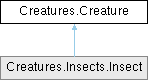
The base class for all creatures.
Unity Properties
In order to control various parts of the creature, certain bones need to be identified in the Configuration section. Bones which are children of a bone listed in this section are detected automatically.
The child bones can be inspected by folding out the parent bone section
It is always possible to manually identify these bones or to override the automatically detected bones by editing the fields of the child bones.
Bones are identified by settings the parameters in the Configuration section to refer to bones in the armature or rig of the model.
- Note
- The configuration parameters should not point to the bones in the 'Target Rig' but to those in the model.
- Configuration
- Head (Creature.head) This shall point to the head bone transform
- Creature.animator
Public Member Functions | |
| virtual Quaternion | GetStdOrientation () |
| Get the standard orientation of the model. | |
| Bone.Pair[] | FindSymmetricBonePairs (Transform[] bones) |
| Find all (left/right) bone pairs in the children. | |
| string | FindLeftBone (string rightBoneName) |
| For a given right bone name, find the corresponding left bone name. | |
| string | FindRightBone (string leftBoneName) |
| For a give left bone name, find the corresponding right bone name. | |
| string | FindOtherBone (string boneName,(string thisSideName, string otherSideName, bool tokenOnly)[] mapping) |
| For a give bone name, try to find the corresponding bone name at the other side of the body. | |
| bool | CheckTargetRig (string targetRigResourceName) |
| Ensure a target rig is available. | |
| virtual bool | CheckTargetRig () |
| Ensure a target rig is available. | |
| bool | CheckModel () |
| Ensure that the creature rig is available. | |
| virtual void | Update () |
| Update the creature. | |
| void | UpdatePose () |
| Update the pose of the creature using the target rig. | |
| virtual void | UpdateModel () |
| Update the bones of the creature's rig from the target rig pose. | |
Static Public Member Functions | |
| static Dictionary< string, Transform > | GetBones (Transform root) |
| Get all protential bones in the model. | |
Public Attributes | |
| Transform | model |
| The (hopefully rigged) 3D model of the creature. | |
| Head | head |
| The head of the creature. | |
| Torso | torso |
| The torso of the creature. | |
| Rig | rig |
| The target bones rig. | |
| Vector3 | fromTargetTranslation |
| The positional different between the target rig and model root. | |
| Quaternion | fromTargetRotation |
| The rotational difference between the target rig and the model root. | |
| Animator | animator |
| The animator of the creature. | |
| Dictionary< string, Transform > | boneDict |
| A dictrionary of all (possible bones) indexed by their names. | |
Protected Member Functions | |
| virtual void | Awake () |
| Unity calls Awake when loading an instance of a script component. | |
| virtual void | Start () |
| Start the creature. | |
Member Function Documentation
◆ GetStdOrientation()
|
virtual |
Get the standard orientation of the model.
- Returns
- The standard orientation of the model
This matches the orientation of the target rig. This orienation does not depend on the orientations of the bones in the model but is derived from the hierarchy of the bones
Reimplemented in Creatures.Insects.Insect.
◆ FindSymmetricBonePairs()
| Bone.Pair[] Creatures.Creature.FindSymmetricBonePairs | ( | Transform[] | bones | ) |
Find all (left/right) bone pairs in the children.
- Parameters
-
bones
- Returns
- The bone paris with item 1 the left bone and item2 the right bone
◆ GetBones()
|
static |
Get all protential bones in the model.
- Parameters
-
root
- Returns
◆ FindLeftBone()
| string Creatures.Creature.FindLeftBone | ( | string | rightBoneName | ) |
For a given right bone name, find the corresponding left bone name.
- Parameters
-
rightBoneName The right side bone name
- Returns
- The left bone name or null when it could not be determined
◆ FindRightBone()
| string Creatures.Creature.FindRightBone | ( | string | leftBoneName | ) |
For a give left bone name, find the corresponding right bone name.
- Parameters
-
leftBoneName The left side bone name
- Returns
- The right bone name or null when it could not be determined
◆ FindOtherBone()
| string Creatures.Creature.FindOtherBone | ( | string | boneName, |
| (string thisSideName, string otherSideName, bool tokenOnly)[] | mapping ) |
For a give bone name, try to find the corresponding bone name at the other side of the body.
- Parameters
-
boneName The bone name mapping The mapping information from left to right or vice versa
- Returns
- The other bone or null when it could not be determined
◆ CheckTargetRig() [1/2]
| bool Creatures.Creature.CheckTargetRig | ( | string | targetRigResourceName | ) |
Ensure a target rig is available.
- Parameters
-
targetRigResourceName The name of the target rig resource
- Returns
- True when the target rig has been updated
The parameter is used to instantiate a new target rig when none has been found.
◆ CheckTargetRig() [2/2]
|
virtual |
Ensure a target rig is available.
- Returns
- True when the target rig has been updated
This tries to instantiate the default target rig resource
Reimplemented in Creatures.Insects.Insect.
◆ CheckModel()
| bool Creatures.Creature.CheckModel | ( | ) |
Ensure that the creature rig is available.
- Returns
- True when the creature rig has been updated
◆ UpdateModel()
|
virtual |
Update the bones of the creature's rig from the target rig pose.
Reimplemented in Creatures.Insects.Insect.
Member Data Documentation
◆ rig
| Rig Creatures.Creature.rig |
The target bones rig.
The target bones rig contain the target pose of the creature The creature movements will try to move the creature such that the target pose is reached as closely as possible
The documentation for this class was generated from the following file:
- Creature.cs
Generated by
 1.15.0